
A Modern Fork of WP Custom Fields Search for Current WordPress Versions
Introduction
Legacy Search Modern is a forked and modernized version of the discontinued WP Custom Fields Search plugin, designed to work with current WordPress environments.
About This Plugin
Legacy Search Modern provides:
- WordPress 6.7 compatibility
- PHP 8.2 compatibility
- Import support for existing WP Custom Fields Search settings
- Shortcode compatibility
- Improved compatibility with existing themes
Legacy Search Modern is an independent fork of WP Custom Fields Search.
It is not affiliated with the original plugin author.
What You Can Do with Legacy Search Modern
Legacy Search Modern allows you to build advanced search forms that combine:
- Post searches
- Custom field searches
- Category searches
- Tag searches
- Custom post type searches
Typical use cases include:
Membership directories
Real estate websites
- Real estate websites
- Job boards
- Store directories
- Product catalogs
- Membership directories
Installation
- Upload the plugin to WordPress.
- Activate the plugin.
- Open:
Initial Setup
Navigate to:
Settings
→ Legacy Search Modern
Recommended Screenshot
- Legacy Search Modern dashboard
- Preset list visible
Creating a Preset
Search forms are managed as Presets.
Click New Preset to create a new search form.
Settings Overview
| Setting | Description |
|---|---|
| Search Title | Name of the search form |
| Fields | Search criteria |
| Add Field | Add a search field |
| Save Changes | Save the preset |
検索条件を追加する
Adding Search Fields
Use Add Field to create search criteria.
Understanding Data Types
Data Type defines what content will be searched.
Post Field
Searches post titles and content.
Custom Field
Searches custom field values.
Category
Searches categories.
Tag
Searches tags.
Post Type
Searches post types.

Recommended Screenshot
Field settings showing:
- Data Type
- Data Field
- Widget
- Compare
Configuring Custom Field Searches
Example:
If you have an ACF field named:
priceConfigure:
Data Type
Custom FieldData Field
priceConfiguring Widgets
Widgets define how users enter search values.
Text Input
Standard text field.
Drop Down
Dropdown selection.
Radio Button
Radio button selection.
Checkboxes
Multiple-choice checkboxes.
Hidden Constant
Hidden predefined value.
Configuring Comparison Methods
Compare defines how search values are evaluated.
Equals
Exact match.
Phrase In
Contains phrase.
Less Than
Less than.
More Than
Greater than.
Range
Within a specified range.
Sort Order
Sort results.
Displaying the Search Form with a Shortcode
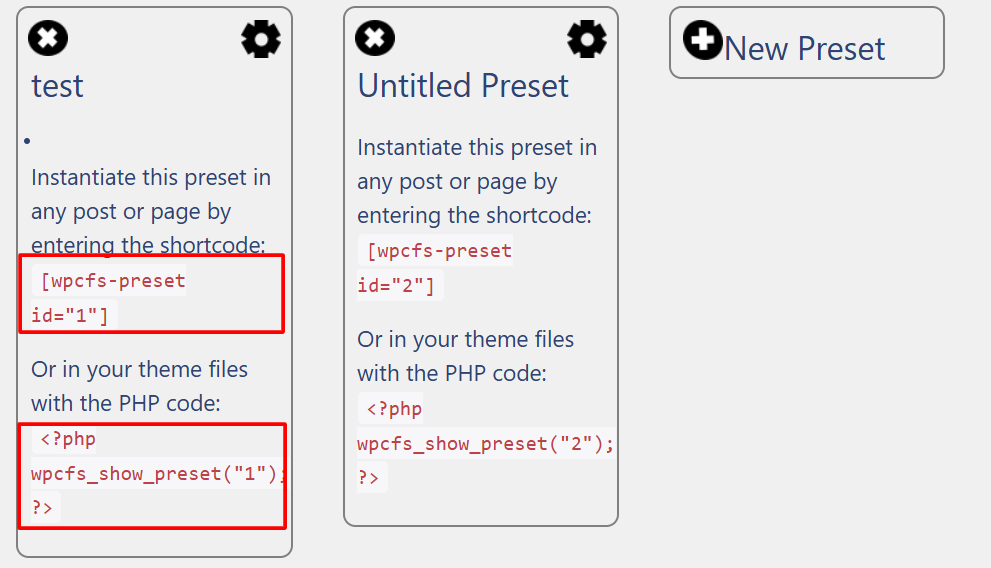
After saving a preset, display it using a shortcode.
Example:
[wpcfs preset="property-search"]※The actual shortcode may vary depending on your preset configuration.
Recommended Screenshot
- Preset editor
- Shortcode display area
ウィジェットで表示する
Displaying the Search Form with Widgets
Legacy Search Modern also supports WordPress widgets.
Navigate to:
Appearance
→ Widgets
and add the Legacy Search Modern widget to your preferred widget area.
Recommended Screenshot
Widget configuration screen.
Migrating from WP Custom Fields Search
Legacy Search Modern includes an import tool for existing WP Custom Fields Search configurations.
Migration Steps
- Install Legacy Search Modern.
- Open the settings page.
- Run the import tool.
- Review imported settings.
- Publish and test the search form.
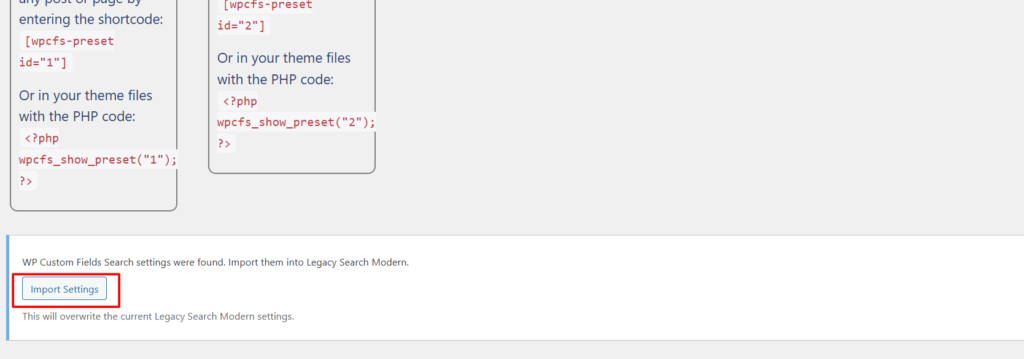
Recommended Screenshot
Import screen showing:
- “Import from WP Custom Fields Search”
- Import button
Frequently Asked Questions
Does it work with ACF?
Yes.
Legacy Search Modern can search values stored in Advanced Custom Fields (ACF).
Does it support PHP 8.2?
Yes.
Legacy Search Modern is actively maintained for compatibility with modern PHP versions, including PHP 8.2.
What is the difference from WP Custom Fields Search?
Legacy Search Modern is a fork designed to provide:
- PHP 8.x compatibility
- Modern WordPress compatibility
- Security improvements
- Ongoing maintenance and support
Conclusion
Legacy Search Modern is a compatibility-focused fork of the discontinued WP Custom Fields Search plugin.
Whether you are migrating an existing site or building a new advanced filtering system, Legacy Search Modern provides a modern solution for powerful WordPress search functionality.